TD World MonitorThe whole world on one live screen.
A professional market terminal that runs in any browser. Commodities, indices, FX, rates, stocks and crypto update live around a photo-real 3D globe that plots satellite fire hotspots, earthquakes, storms and the news as it breaks. Full-screen fundamentals, economy, calendar and positioning screens sit one command away. I designed and built all of it, and it is free to use.
The full terminal: nine live panels around a 3D globe, with a command line on top.
- Live panels
- 10
- Globe layers
- 10
- News sources
- 568
- Economies
- 39
- Market instruments
- 38
- Stocks + your list
- 38
- Top crypto
- 30
Every feature, screenshot by screenshot.
The whole terminal, documented below: the globe, the market panels, the full-screen macro screens, the command line and the phone layout. Every image is a real capture of the live app — click one to enlarge it.
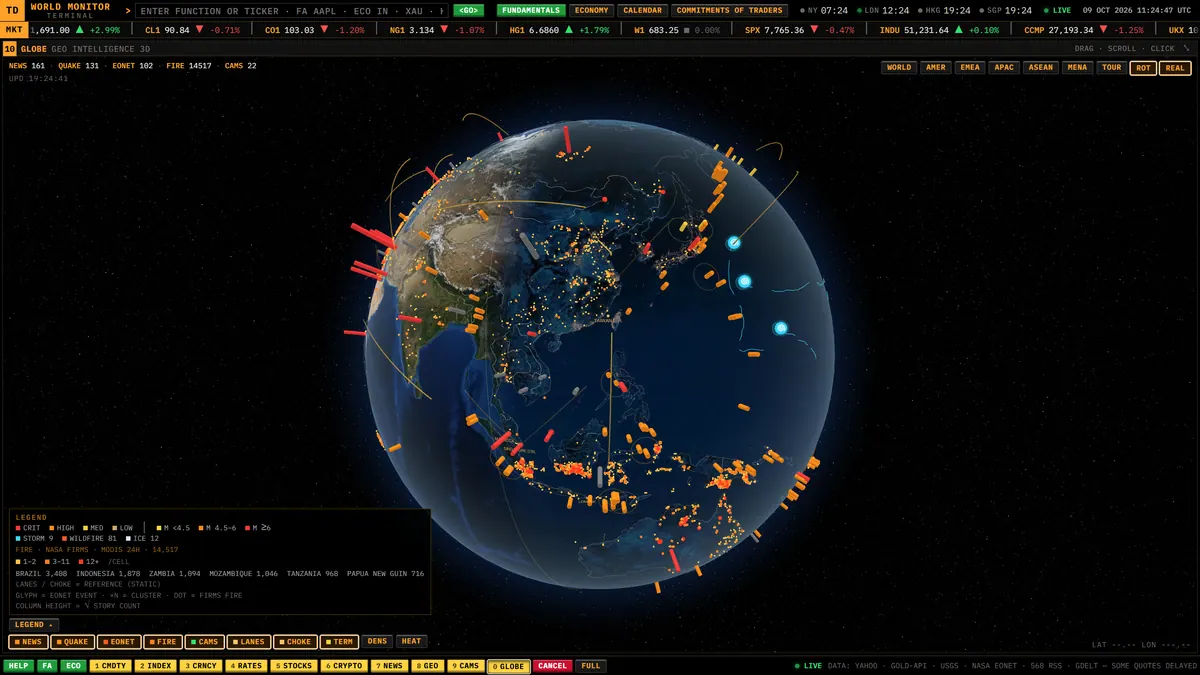
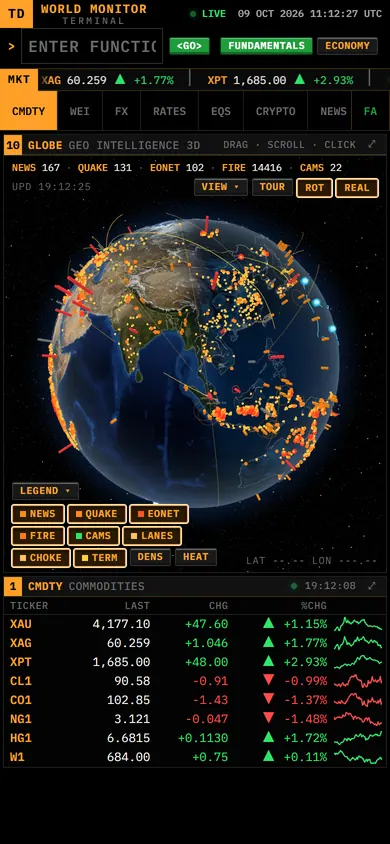
Geo Intelligence 3D — a photo-real Earth with live layers on top.
Satellite fire hotspots — every detection from the last 24 hours, by intensity.
Natural events and earthquakes: wildfires, storms, sea ice and quakes.
News heat — which countries the world is writing about right now.
A living, photo-real globe
At the centre of the terminal is a real 3D Earth: NASA Blue Marble by day, city lights by night, and the day/night line where it actually is right now. Ten live layers sit on top, so you see where things are happening instead of just reading about them.
- NASA FIRMS satellite fire hotspots: every detection from the last 24 hours, coloured by intensity, with one-click fly-to for the most active countries
- NASA EONET natural events (wildfires, severe storms and their tracks, volcanoes, sea and lake ice), merged into map markers that show how many events each one stands for
- USGS earthquakes: M2.5+ from the last day and M4.5+ from the last week
- Geolocated headlines drawn as columns, plus a news-heat shading of every country
- Trade lanes, maritime chokepoints, live border cameras and the day/night terminator
- Region presets for World, Americas, EMEA, Asia-Pacific, ASEAN and MENA, plus auto-rotation and a hands-free tour mode for wall displays
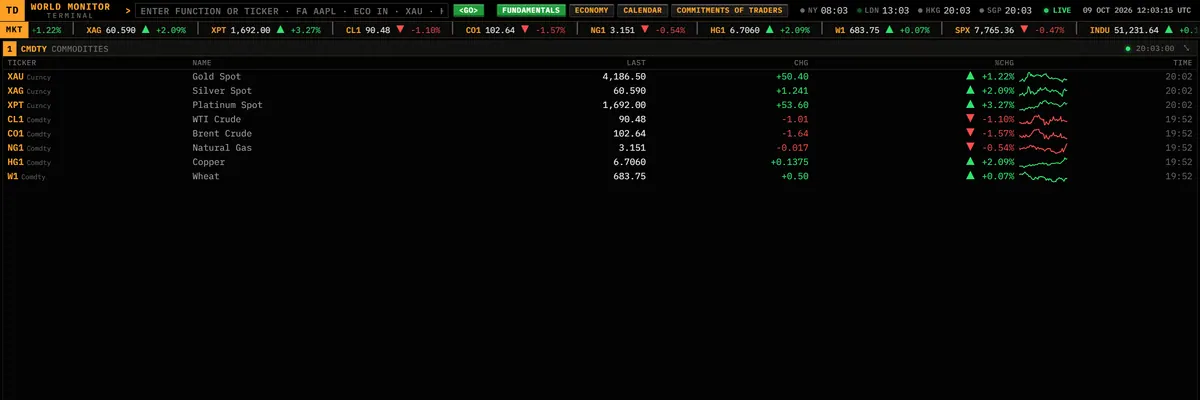
Commodities — gold, silver and platinum spot, crude, gas and grains.
World equity indices: Americas, EMEA and Asia-Pacific.
Currencies — majors, Asian crosses and the dollar index.
Rates & volatility: US Treasury yields from 3 months to 30 years, plus the VIX.
Every market that matters, live
Four dense panels cover the macro board: commodities, world indices, currencies, and rates & volatility. Each row has a live price, the daily change and a rolling 24-hour sparkline. Green is up, red is down, and nothing on screen is decoration.
- 38 instruments across metals, energy, grains, world indices, FX, US Treasury yields and the VIX
- Gold, silver and platinum quoted at spot, not only as futures
- Rolling 24-hour sparklines that stay populated when a futures session resets
- Click any row, or type its code, to open the full chart
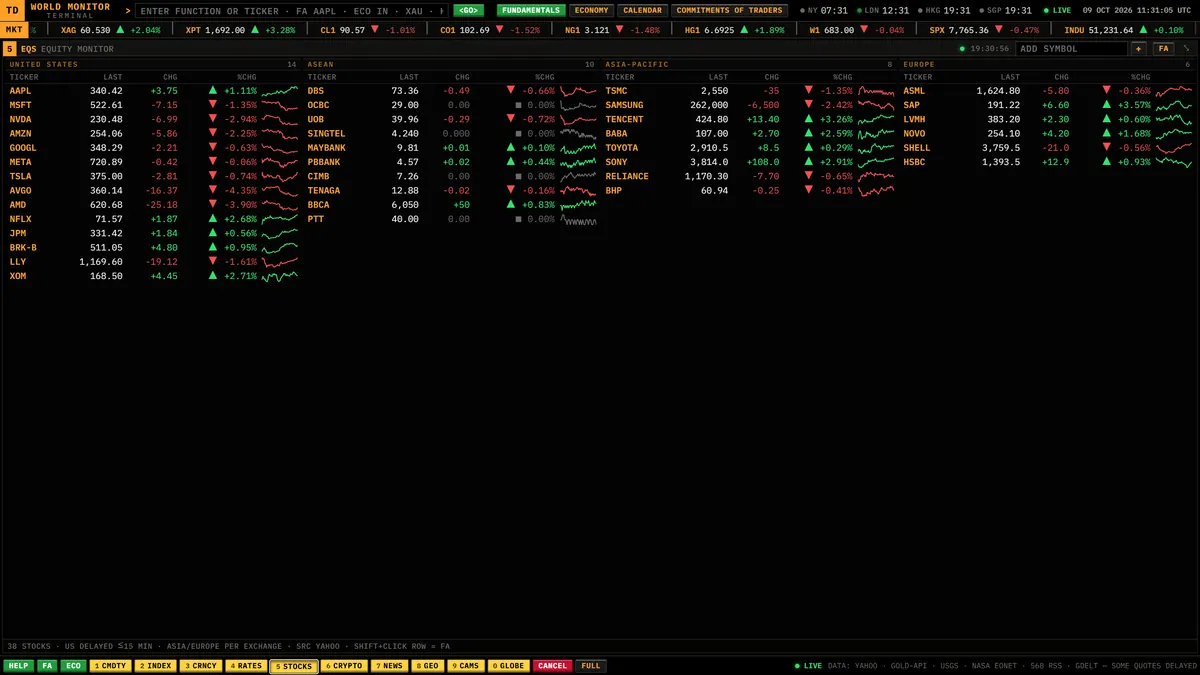
Equity monitor: 38 bellwether stocks from the US, ASEAN, Asia-Pacific and Europe.
Crypto — the top 30 coins, live.
Stocks and coins, side by side
There are 38 bellwether stocks from the US, ASEAN, Asia-Pacific and Europe, and next to them the top 30 cryptocurrencies by market cap. Every row has a sparkline, and any of them opens a chart with one keystroke.
- US mega-caps listed next to ASEAN banks and utilities (DBS, Maybank, Public Bank, Tenaga…) and leaders from Asia-Pacific and Europe
- MY LIST: add up to 20 symbols of your own (ADD NFLX, DEL NFLX), saved in your browser
- Top-30 crypto with rank, market cap and 1h / 24h / 7d change. Stablecoins and wrapped tokens are filtered out
- Any stock or coin opens a chart, including exchange-suffixed symbols such as 0005.HK
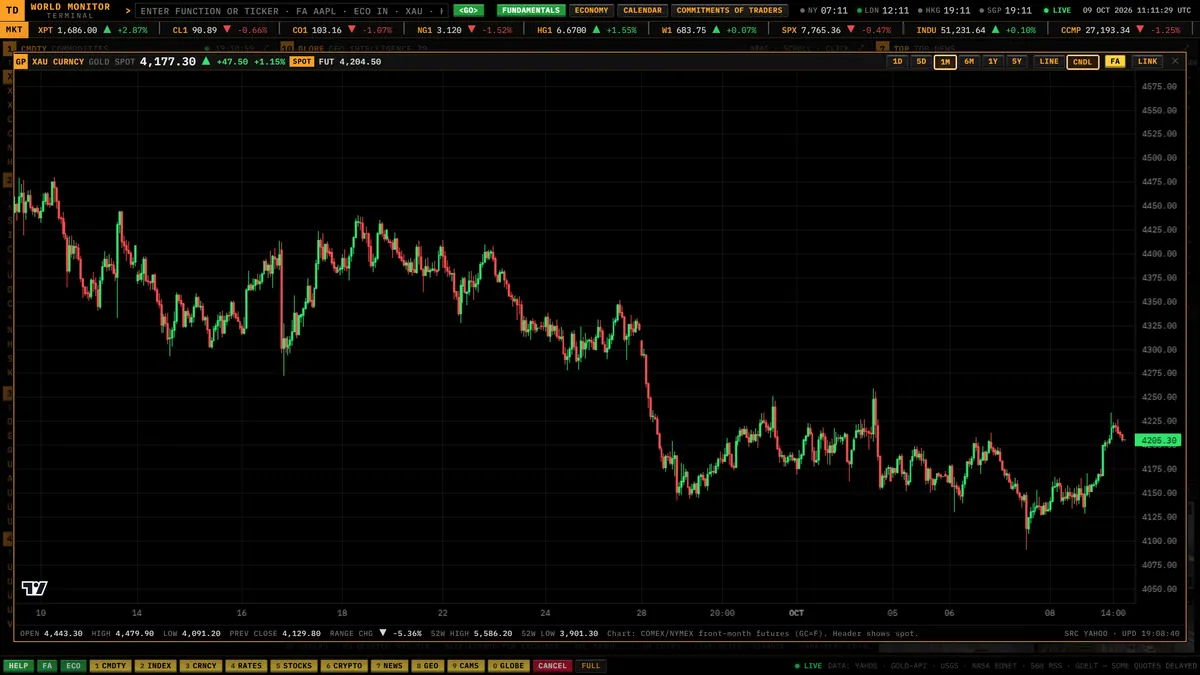
Charts — line or candles, from one day to five years.
One keystroke to a chart
Type a code such as XAU, CL1, SPX, USDMYR, AAPL or BTC, and a full chart slides over the terminal. You can switch between line and candles and pick any range from one day to five years.
- Line or candlestick view, with ranges from 1D (a rolling 24 hours) to 5Y
- LINK copies a deep link that reopens the exact same chart
- FA jumps from the chart straight to the instrument's fundamentals
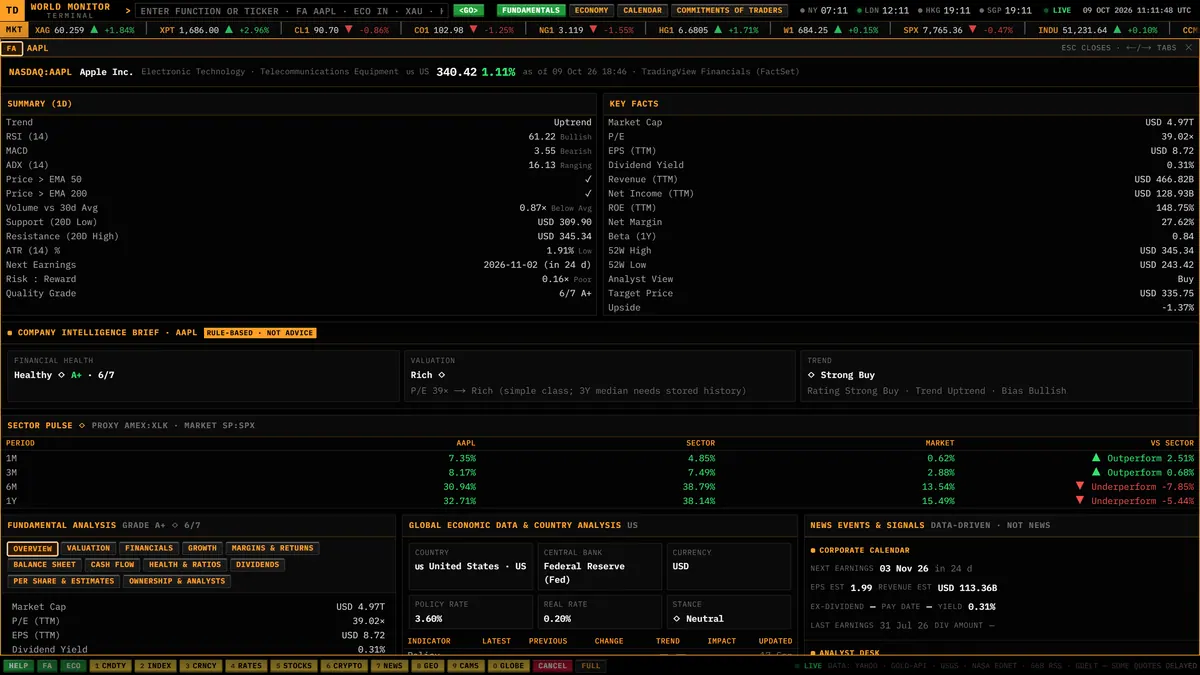
FUNDAMENTALS — a full sheet for any stock.
…and for commodities such as gold.
Fundamentals for anything you can trade
One command builds a full-screen fundamentals sheet for a stock, a forex pair or a commodity. A stock gets its company numbers. A currency pair gets the economies behind it. A commodity gets its market facts, how futures traders are positioned, and the headlines moving it.
- Stocks: Overview, Valuation, Financials, Growth, Margins & Returns, Balance Sheet, Cash Flow, Health & Ratios, Dividends, Per Share & Estimates, and Ownership & Analysts
- A quality grade that scores the company on transparent pass/fail checks
- Forex pairs and commodities get their own layouts: key facts, the economy on each side of the pair, positioning and headlines
- Search with suggestions, recently viewed symbols and a popular grid
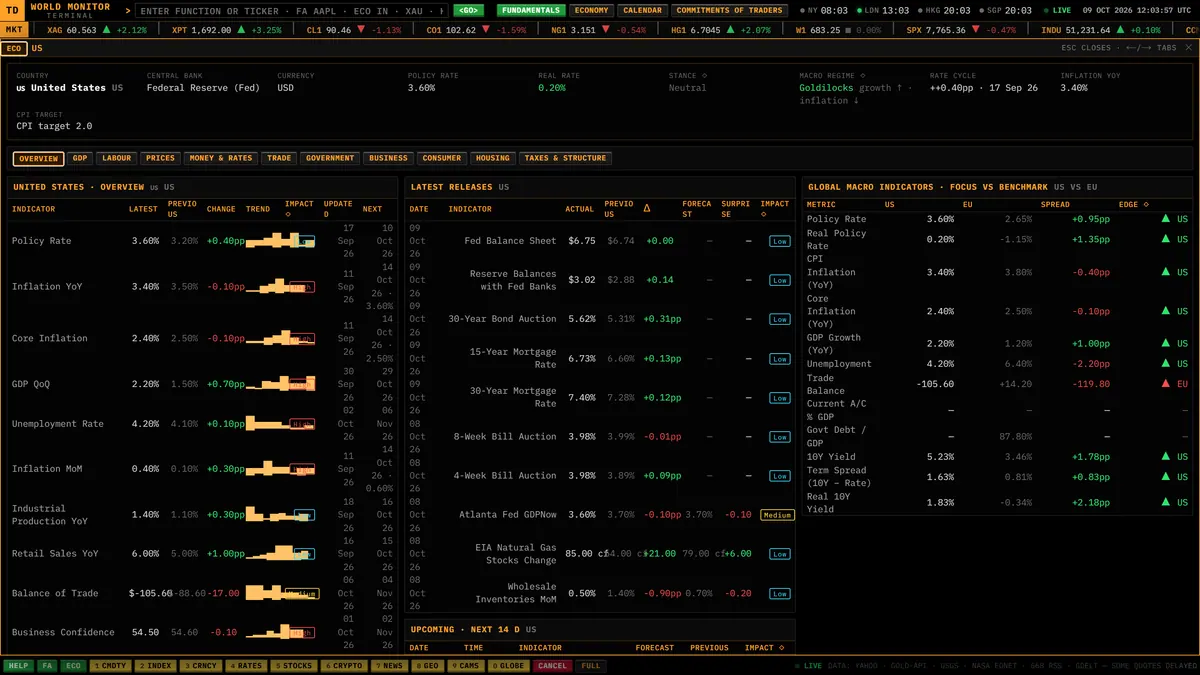
ECONOMY — a country's data on one screen.
A whole economy on one screen
ECONOMY puts a country's data on one page, with GDP, labour, prices, money & rates, trade, government, business, consumer, housing, and taxes & structure each in its own tab. It also works with a currency pair or a symbol and shows the economies behind it.
- 39 economies, picked from a launcher with search
- Eleven tabs, from GDP and inflation to housing and tax structure
- Compare two economies on the same metric
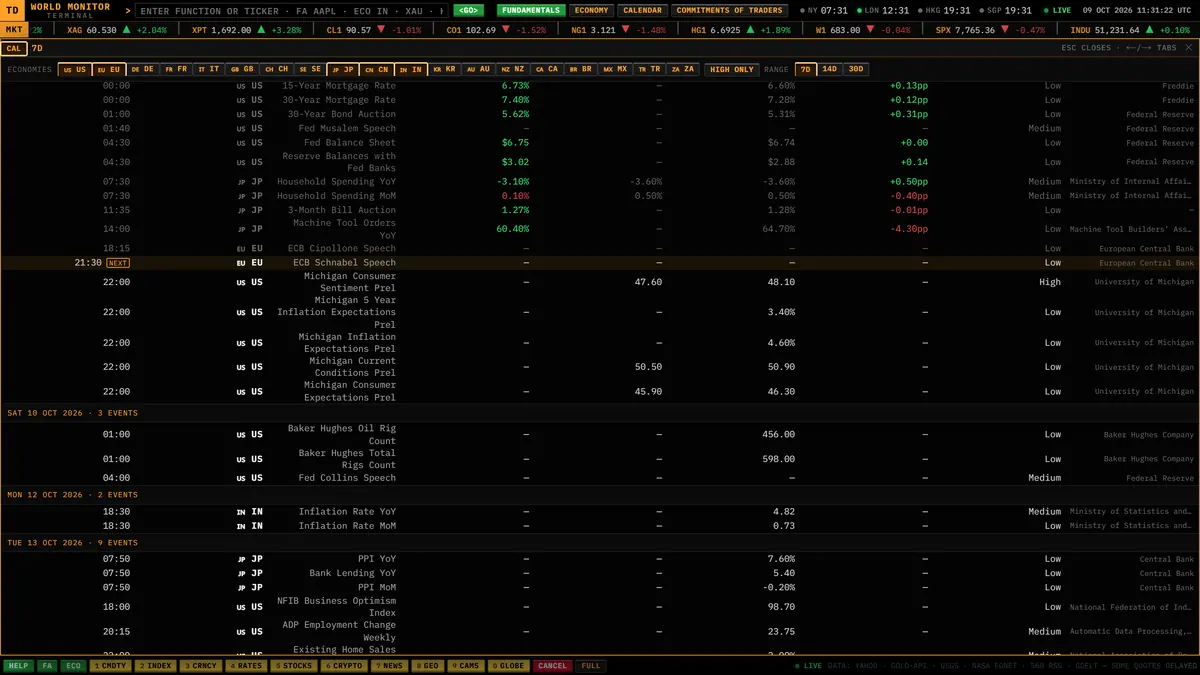
CALENDAR — the releases coming up, by economy.
The releases that move markets, ahead of time
CALENDAR lists economic releases (rate decisions, inflation, jobs, GDP) for the economies you choose, in a 7-, 14- or 30-day window.
- Starts with the US, the euro area, China, Japan and India, and you can change the list (for example CAL US,IN 7D)
- Ranges of 7, 14 and 30 days
- Also on the header, one click away
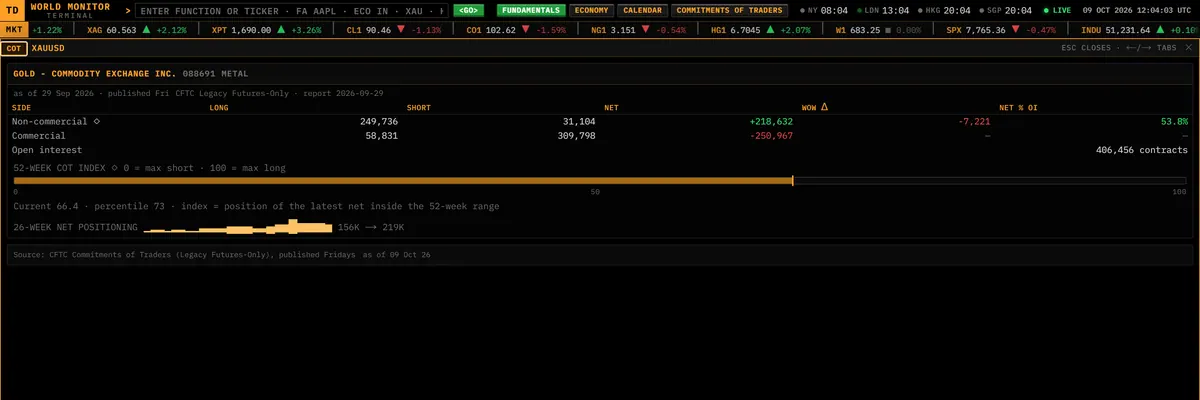
COMMITMENTS OF TRADERS — who is long and who is short.
See how the big players are positioned
COMMITMENTS OF TRADERS turns the weekly CFTC report into a single card for a contract: who is long, who is short, and how that has changed. Gold, oil, currencies and index futures are all covered.
- Built from the official CFTC public reporting data
- Common names work: SPX and NDX map to the ES and NQ futures
- 15 popular contracts one click away in the launcher
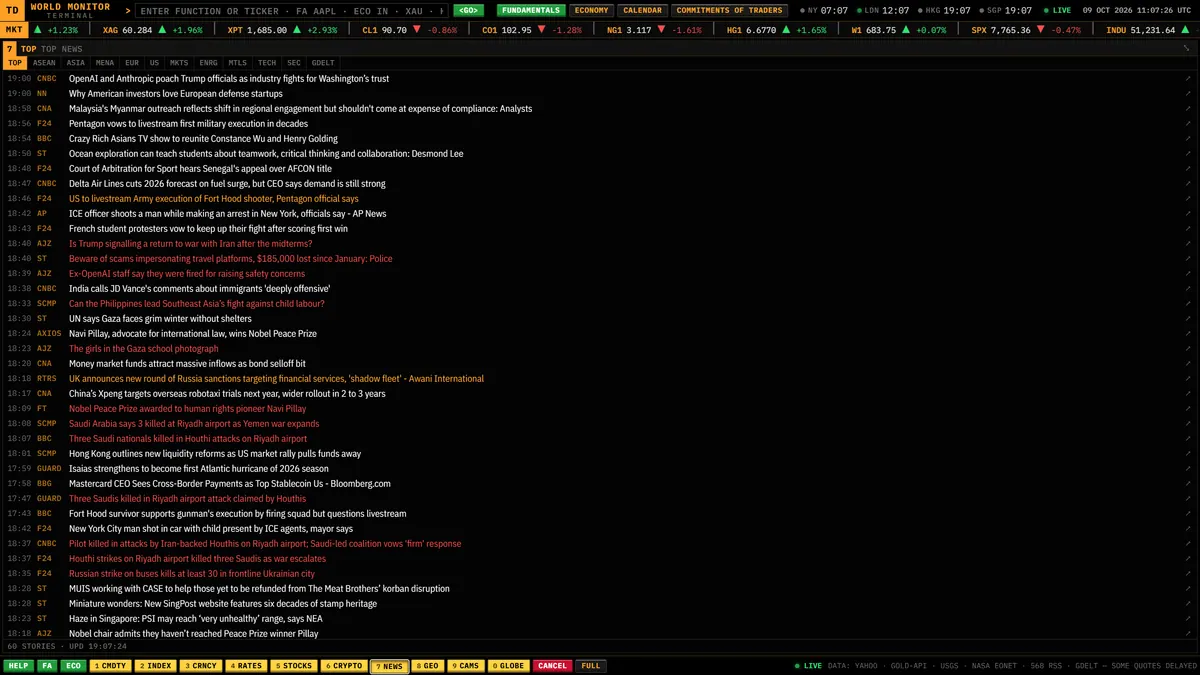
News — curated from 568 sources, de-duplicated, in 12 tabs.
The news, without the noise
Headlines come from 568 news sources. A curated tier-one wire leads, near-duplicates are collapsed, and no single outlet is allowed to flood the list. Twelve tabs slice the feed by region and topic.
- Tabs: TOP, ASEAN, ASIA, MENA, EUR, US, MKTS, ENRG, MTLS, TECH, SEC and GDELT
- Stories are geolocated and drawn on the globe
- Type a country name to fly there and filter the news to it
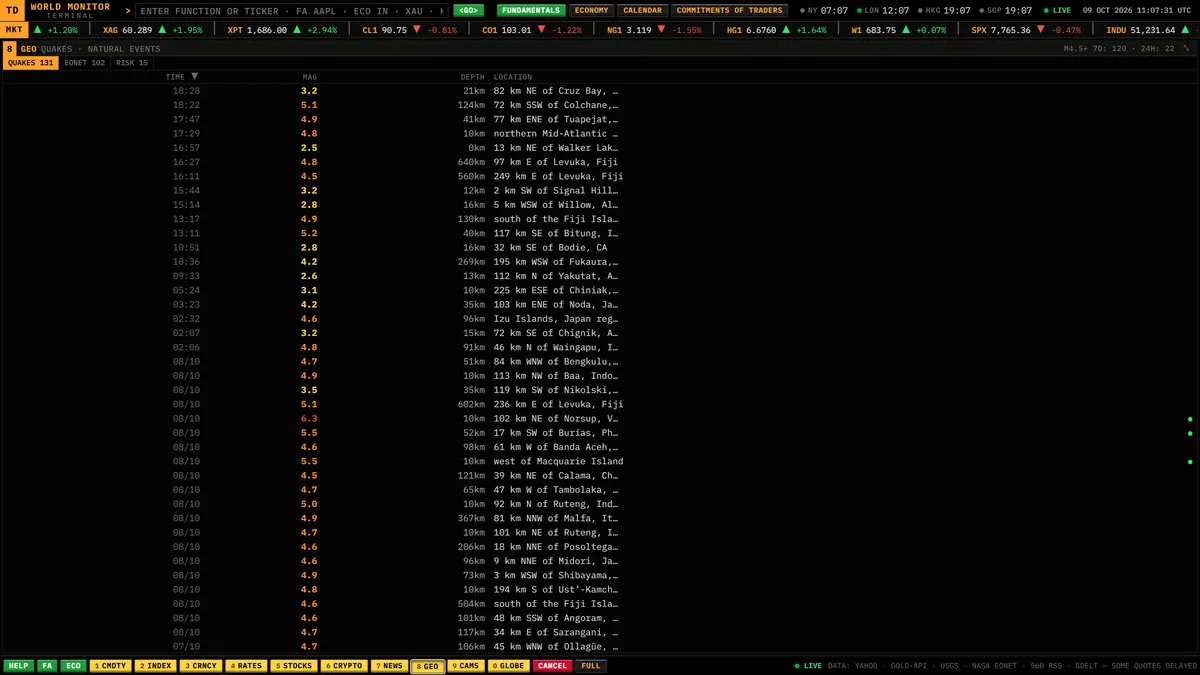
GEO: the latest earthquakes, with natural events and risk one tab away.
Earthquakes, natural events and risk
The GEO panel lists the latest earthquakes and the open natural events, next to a country risk ranking, so you can see what is happening on the planet before it reaches the headlines.
- USGS earthquakes with magnitude, depth and location
- NASA EONET open natural events by category
- A country risk ranking, refreshed with the news flow
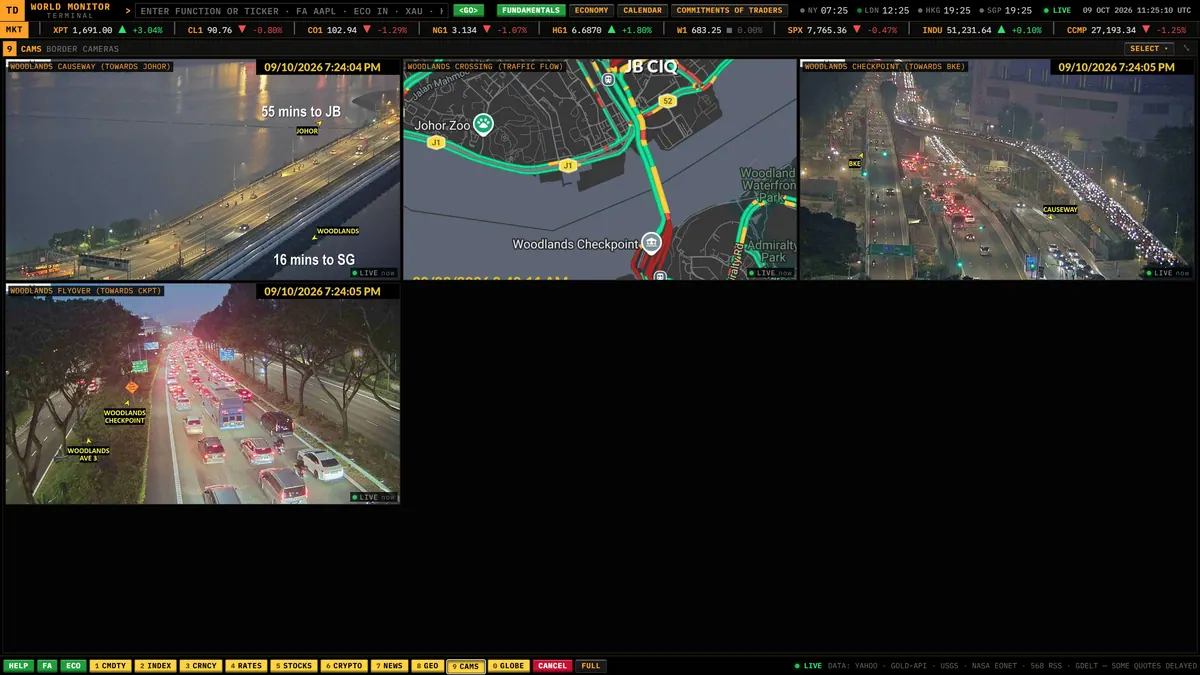
Border cameras: live traffic at the Johor–Singapore Woodlands crossing.
Live eyes on the border
Public traffic cameras at the Johor–Singapore Woodlands crossing refresh on their own inside the terminal, next to a live traffic-flow map, and any of them opens full-size in one click.
- Public camera feeds loaded through a secure proxy
- One click to view full-size
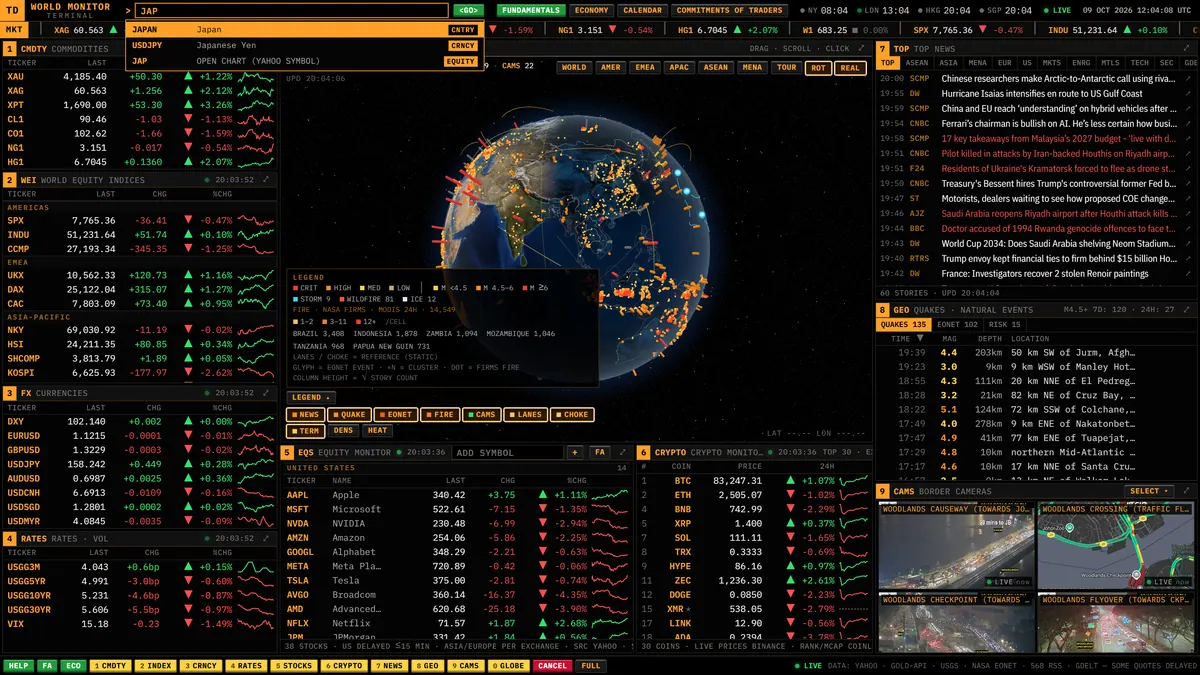
The command line — type a few letters and it completes for you.
HELP — every command and hotkey in one place.
Run the whole terminal from the keyboard
Every view is a command. Type a few letters and the command line completes it: an instrument, a stock, a country, a region, a news tab or a screen. Every command also works as a link, so you can share exactly what you are looking at.
- Autocomplete across functions, instruments, stocks, countries, regions and news tabs
- Deep links like trovedeck.com/world-monitor?cmd=FA%20AAPL open straight into a view
- Number keys maximise panels, / jumps to the command line, F1 opens help
Every panel one tap away.
The globe in your pocket.
Full screens, phone-sized.
From a wall display to your phone
On a desktop the whole terminal fits on one screen. A tablet gets two scrolling columns, and a phone gets a tab bar. It is the same app and the same live data at every size.
- Desktop: a single-screen grid that fills the viewport, which also works for wall displays in tour mode
- Tablet: two columns
- Phone: a tab bar, with the FA (fundamentals) tab always one tap away
Every command is a link.
Click any command to open the live terminal running it — the same URL you can bookmark, share or paste into a chat. Type it in the terminal and the line completes it for you.
- 1 – 9, 0Maximise a panel (0 = globe)
- / · Ctrl KJump to the command line
- F1 · ?Open help
- RStart or stop globe rotation
- EscClose the top screen
On phones the number keys switch tabs instead of maximising panels.
Real data only.
No simulated prices, no synthetic headlines. Every panel is fed by public market feeds and open scientific or government sources, refreshed on the cadence shown on each card.
Market prices
Commodities, indices, FX, rates and stocks from public market data feeds
Precious metals spot
Gold, silver and platinum spot quotes
Crypto
Top-30 universe with exchange prices
NASA FIRMS
MODIS satellite fire detections, last 24 h
NASA EONET
Open natural events and storm tracks
USGS
Earthquakes, M2.5+ (24 h) and M4.5+ (7 d)
CFTC
Commitments of Traders, weekly public reporting
News
568 curated sources, plus the GDELT event stream
Cameras
Public traffic cameras at the Johor–Singapore crossing
Open the whole world on one screen.
TD World Monitor is free to use and needs no account. Want a custom terminal or dashboard built the same way? Work with me.
TD World Monitor is for information only and is not financial advice. Market data may be delayed or incomplete, and third-party data belongs to its respective owners.